Note
Please visit the MLE NPAP Product Page for availability, features, and pricing information.
Note
Please see the MLE NPAP Datasheet for technical details such as FPGA resources.
Note
Please see our many NPAP Technical Briefs and Application Notes featuring NPAP.
NPAP Evaluation Reference Design Guide
For MLE NPAP, the TCP/UDP/IPv4 Full Accelerator, we provide various so-called Evaluation Reference Designs (ERD). These ERDs serve two purposes: a) to facilitate evaluating, testing and benchmarking NPAP on a select list of off-the-shelf FPGA boards. And, b) to serve as a reference when integrating NPAP into your FPGA design.
If you have not yet done so, please start with the NPAP Datasheet as this serves as a high-level documentation, including the NPAP Compile-Time parameters and NPAP Runtime parameters. It also discusses architectural aspect when using network protocol acceleration.
Because each ERD is implemented with different NPAP Compile-Time Parameters (the number of TCP Core instances, for example), this ERD Guide lists all available NPAP ERDs along with their parameterizations, enabling you to choose the ERD with the ideal configuration for your specific needs.
Figure 1 shows an exemplary ERD which comprises 5 TCP Cores (3 TCP Cores for so-called TCP User Sessions plus 2 TCP Cores exclusively reserved for Netperf), the Netperf IP core itself, one UDP Core (shared between UDP Users Sessions and Netperf), plus the (optional) Network Impairment Generator (IPA), plus (optional) diagnostics counters.
Each so-called TCP Wrapper allows running a TCP User Session where you can either use our built-in Data Generators / Data Checkers (DGC), or a TCP loopback. The same applies to UDP.
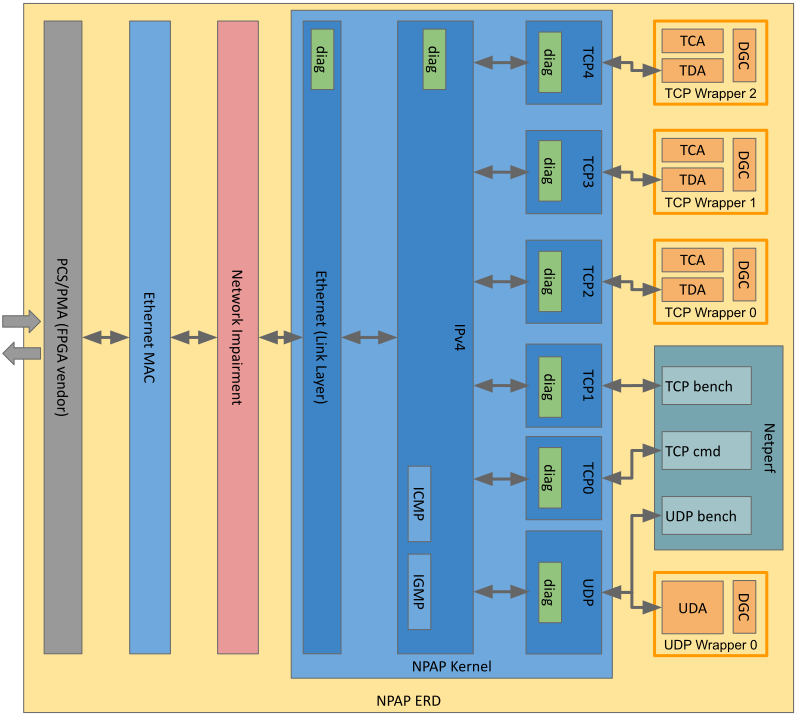
Figure 1 NPAP Blockdiagram detailing the dataflow.
To simplify your evaluation process, this guide is divided into three chapters:
The chapter NPAP ERD Overview is your primary reference for finding a suitable ERD. It lists all ERD configurations together with necessary links and hints to correctly set up the underlying hardware.
Chapter How to evaluate NPAP using the ERD provides the hands-on commands for setting up your host PC and performing initial connectivity and performance tests with tools like ping and netperf.
Chapter Default Parameters lists the default ERD parameters.